
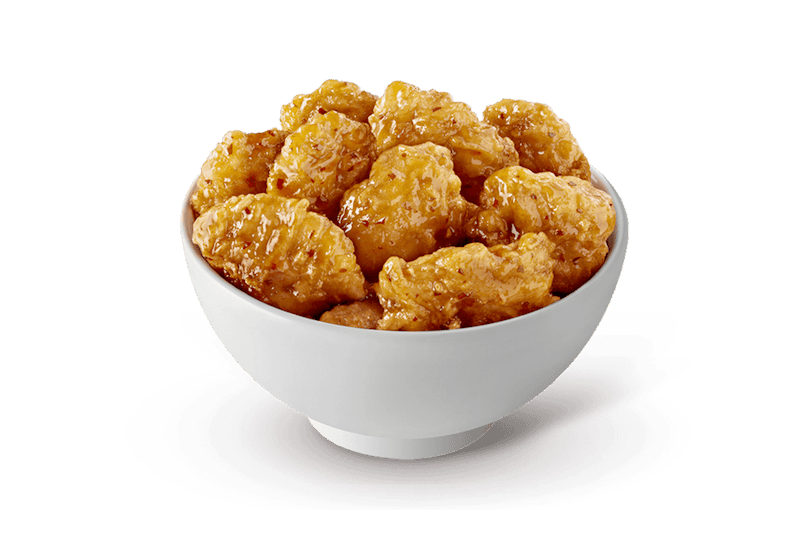
Quick answer: How many calories are in Panda Express Orange Chicken? The official-source snapshot used by this site lists 510 calories for the standard 5.92 oz serving. That number is a useful planning anchor, but it describes the named nutrition-table serving rather than every scoop, box, or custom combination. Use the guide below to read the rest of the panel and build a complete order estimate.
Use the listed serving as your starting point
The 510-calorie figure is tied to a standard Orange Chicken row in the dated nutrition snapshot. The row also lists a 5.92 oz portion, which gives the number context. It is more precise to say “510 calories per listed serving” than to assume that every takeout container contains exactly one table serving. A scoop can be larger or smaller, and a customer may select more than one entree serving in the same order.
When you are comparing menu choices, keep the unit and the item together. The calories are not a free-floating number that can be moved between a standard entree, a Cub Meal, and a side. The snapshot contains separate rows for some formats, and those rows should be selected separately in the Panda Express calorie calculator. This prevents a common mistake: using the standard entree value for a child-format portion or treating a larger order as one mysterious serving.
Read the complete Orange Chicken nutrition panel
Calories are only the first line. The same standard row lists 24g of total fat, 53g of carbohydrates, 2g of dietary fiber, 16g of protein, and 850mg of sodium. Those values describe the same listed serving, so they are useful for comparing a complete plate rather than judging the entree in isolation. For example, a side can add more carbohydrates without adding much fat, or it can add fiber while changing the sodium total in the opposite direction.
The panel is best used as a set of trade-offs. Orange Chicken contributes meaningful protein, but it also brings a substantial carbohydrate, fat, and sodium load for one standard serving. That does not make the item “good” or “bad”; it tells you what to account for when the rest of the meal includes a side, a second entree, an appetizer, or a drink. The Nutrition page page keeps the full source columns visible so you can inspect fields that a quick calorie search may hide.
- Calories: 510 per 5.92 oz standard serving.
- Total fat: 24g; carbohydrates: 53g; dietary fiber: 2g.
- Protein: 16g; sodium: 850mg.
How to calculate the whole order
A complete order is an addition problem. Start with Orange Chicken at 510 calories, choose the exact side row, then add any additional entree using its own listed serving. If you choose Orange Chicken twice, multiply the Orange Chicken row by two; do not multiply every item in the box unless you actually selected two of each item. The calculator keeps the quantity attached to the selected row so the receipt remains readable.
Try this workflow before you order: open the Panda Express calorie calculator, search for Orange Chicken, select the standard variant, and add it once. Search for the side you are considering, then read the live Meal total. Add a second entree only after checking its serving label. Finally, review sodium, carbohydrates, fat, fiber, and protein alongside calories. This sequence answers the practical question behind a calorie lookup: what will the entire planned meal contain?
- 1. Select the exact Orange Chicken serving shown in the source table.
- 2. Add one side and read the new total instead of guessing a box multiplier.
- 3. Add or increase an entree only when that quantity matches your order.
- 4. Check the complete nutrition receipt and save it for reference.
The side can change the direction of the meal
In this snapshot, a standard Super Greens side is 130 calories, while White Steamed Rice is 520 calories. Pairing either with the same 510-calorie Orange Chicken row produces a very different modeled total: 640 calories with Super Greens or 1,030 calories with White Rice before any second entree or beverage. Those are arithmetic examples from listed rows, not promises about how a particular restaurant scoops a side.
The difference is not just energy. Super Greens lists 7g of fiber and 9g of protein with 14g of carbohydrates, while White Rice lists 118g of carbohydrates, 0g of fiber, and 10g of protein. Super Greens also lists 370mg of sodium, whereas White Rice lists 0mg in the source row. Your reason for choosing a side may be taste, texture, availability, or a personal plan; the useful practice is to see the complete numbers before deciding. The Menu guide guide helps you browse those side rows in context.
Why the real portion may not look identical
Restaurant food is assembled by people, and the amount in a scoop or takeout box can vary. Preparation batches, utensil fills, substitutions, regional availability, and the number of items selected all affect what you receive. The official table is still the right reference for planning because it gives a consistent named serving, but it should not be presented as a laboratory measurement of one particular order.
If your order looks larger than the listed portion, resist the temptation to invent an exact multiplier from appearance alone. Record the selected format, use the matching row in the calculator, and keep the result labeled as an estimate. For a current ingredient, allergen, or menu-availability question, use the official Panda Express nutrition page nutrition resource directly. This is especially important when a change affects a health or allergy decision.
A simple Orange Chicken pre-order checklist
A few deliberate checks make the 510-calorie answer more useful than a search-result headline. Confirm that you selected the standard entree rather than a Cub Meal row, decide whether you are ordering one or two entree servings, and choose the side before you estimate the total. If you are sharing food, calculate the full selected quantities first and then describe your own share separately; do not relabel the whole box as one personal serving.
Next, review the fields that matter for your planning question. Protein can help compare entrees, fiber can distinguish side choices, and sodium may be important when several prepared components are combined. None of these fields turns the calculator into medical advice. They simply make the source information easier to inspect. Save the result or return to the Panda Express calorie calculator if you change a side, add a drink, or swap an entree.
Use the dated source for the final check
This guide uses the Panda Express nutrition snapshot captured August 17, 2026. Menus, recipes, serving practices, limited-time products, and availability can change. The calculator and Nutrition page page are independent planning tools, not an affiliation or guarantee from Panda Restaurant Group. Before ordering, confirm current details with the official Panda Express nutrition page source, especially when ingredients, allergens, or a strict dietary requirement are involved.
Keep planning with the calculator
Use the linked tools to test the exact combination you are considering. Each destination keeps the serving label visible so your estimate stays tied to the same source row.
Last updated: August 17, 2026 Values are planning estimates from the dated official-source snapshot. Verify current nutrition, ingredients, allergens, and availability with Panda Express before ordering. Official nutrition source